Abstract & Artistic watch face
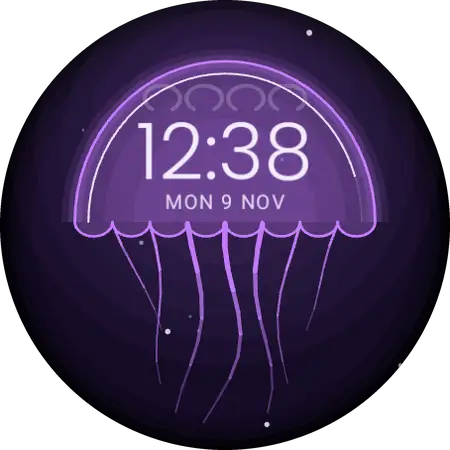
Moon Jelly — abstract watch face for Galaxy Watch
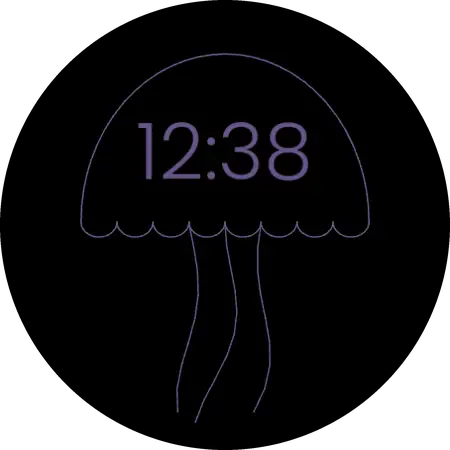
A glowing moon jellyfish fills the dial with the time shining inside its bell. The bell slowly pulses, its long arms drift and sway, and tiny motes rise through the dark water while a fine arc along the bell shows your battery.
- Free — no account, no sign-up
- Applies over Bluetooth, no PC or cable
- Needs Wear OS 6 or newer on the watch
Moon Jelly is part of the premium collection, so applying it needs the app's subscription. Everything else works the same way — and the app has plenty of free faces if you would rather start there.
More views of Moon Jelly
Will Moon Jelly work on my Galaxy Watch?
What matters is the software on the watch, not which model it is. These faces install through Watch Face Push, which arrived with Wear OS 6 — so any Galaxy Watch running Wear OS 6 or newer can use Moon Jelly, and one running anything older cannot, however new the hardware is.
| Watch software | Wear OS 6 (One UI 8 Watch) or newer — the requirement is the software, not the model |
|---|---|
| Supported watches | Galaxy Watch 4 and newer — Watch 4, 5, 6, 7, 8 and 9, plus Watch FE, Watch Ultra and Watch Ultra 2, including every Classic and Pro variant |
| Already on it | Galaxy Watch 8 shipped with it, Watch 9 and Watch Ultra 2 ship with the newer Wear OS 7, and Samsung finished the rollout to every older eligible watch in December 2025 |
| Not supported | Galaxy Watch 3 and older, and Gear-series watches — these run Tizen, not Wear OS |
| Still on older software? | Update the watch from the Galaxy Wearable app on your phone — One UI 8 Watch is available for it |
| Phone | Android, paired with the watch in the Galaxy Wearable app |
| Price | Free. No account, no sign-up |
Not sure which version you have? On the watch: Settings → About watch → Software information.
How to install Moon Jelly on your Galaxy Watch
About a minute, start to finish, and the watch stays on your wrist the whole time.
- Install FacesLand on your phone
Get the free app from Google Play. There is nothing to sign up for.
- Open it next to your watch
The app finds the Galaxy Watch already paired with your phone. Keep both nearby and Bluetooth on.
- Find Moon Jelly and tap Apply
Browse or search for Moon Jelly, open it, and tap Apply. The first time, the watch asks for permission — accept it on the watch.
- The face installs over the air
The face transfers to the watch wirelessly and switches on by itself. No PC, no cable, no file transfer.
Get Moon Jelly
It is in the free FacesLand app, alongside the rest of the abstract collection.
More abstract watch faces
From the same collection — see all 17 abstract & artistic faces.
Browse the whole catalogue · added 2026-11-27